Best Phone, Tablet, or Watch for Your Use Case: Students, Creators, Travelers, and Gamers
Spec sheets rarely map cleanly onto how a device actually gets used. A student cramming for exams, a hybrid worker editing photos on the train, and a weekend hiker tracking a trail run have almost nothing in common in terms of what "best phone" or "best tablet" even means. Instead of ranking devices in the abstract, this guide matches the ten phones, tablets, and watches in our catalog to five concrete use cases, so you can shop by what you actually do rather than by benchmark scores.
For students: value and battery life over raw power
Students need devices that survive a full day of classes without a charger in sight, and that do not demand a premium budget on top of tuition. The Galaxy Tab A9 is the obvious tablet pick here — cheap enough to not worry about in a shared dorm, with enough battery for a day of note-taking and reading, and Samsung's multi-user profiles make it easy to keep coursework separate from entertainment. On the phone side, the Pixel 8's lower launch price and seven-year update commitment mean it will still be receiving security patches well after graduation, which matters more for a device you cannot easily afford to replace early.
For creators: display quality and stylus input matter most
Anyone sketching, annotating PDFs, or editing photos on the go should prioritize display accuracy and pen input over almost anything else. The Galaxy Tab S9 is the clear pick among the tablets here: its AMOLED panel is genuinely accurate for color work, the S Pen ships in the box rather than costing extra, and Samsung DeX mode gives creators a real windowed workspace when a keyboard is attached, rather than forcing every task through a single full-screen app. Pair it with the Galaxy S24 for a phone that shares the same camera color science and Samsung Notes ecosystem, so sketches and photo edits sync cleanly between the two screens without extra setup.
For travelers: battery, durability, and offline resilience
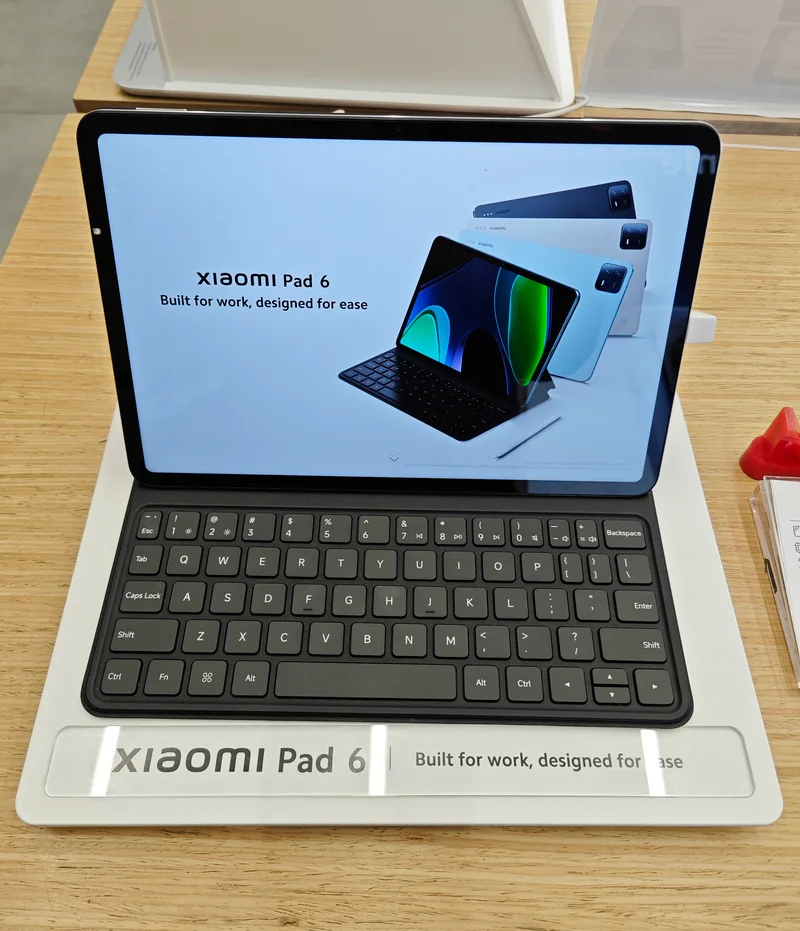
Travel punishes devices in ways daily use does not — spotty charging access, drops, and long stretches without Wi-Fi. The Xiaomi Pad 6's 8,840 mAh battery is the largest of any tablet in our lineup, comfortably lasting a long flight of offline video playback. On the watch side, the Galaxy Watch6 and Pixel Watch 2 both carry 5ATM and IP68 ratings, meaning a spilled drink in an airport lounge or an unexpected rain shower will not end the trip early — neither watch is built for serious diving, but both comfortably handle the accidents that actually happen while traveling.
For gamers: sustained performance and a high refresh rate
Mobile gaming rewards two things most other use cases do not weigh heavily: a high refresh-rate display for smooth motion, and a chipset that does not throttle under sustained load. The Xiaomi Pad 6's 144Hz display is the fastest panel in our tablet lineup, and while the Snapdragon 870 inside is not the newest silicon available, it still handles most Play Store titles at high settings without stutter. On phones, the Galaxy S24's Snapdragon 8 Gen 3 for Galaxy variant benchmarks ahead of the Pixel 8's Tensor G3 specifically in sustained, thermally-limited sessions, which is the scenario that actually matters for a 45-minute gaming session rather than a short synthetic benchmark run.
For fitness and outdoor use: health sensors and GPS accuracy
Buyers who care most about workout tracking should look at watches first and phones second. The Galaxy Watch6 packs the deepest sensor suite of the three watches here, including bioimpedance body composition and blood pressure monitoring, though several of those features require pairing with a Samsung phone specifically to unlock. Buyers on any other Android phone, or who simply want the most consistent experience regardless of phone brand, should look at the Pixel Watch 2 instead — its Fitbit-derived Daily Readiness Score is one of the more genuinely actionable fitness metrics on any smartwatch, and it works identically well no matter which Android phone it is paired with.
For parents and families: shared devices and parental controls
Families shopping for a shared household tablet have different priorities than any individual buyer: durability against drops, genuine parental controls, and a price low enough that replacing it in two years is not a financial event. The Galaxy Tab A9 again stands out here, specifically because Samsung Kids goes well beyond simple app blocking — it offers curated content bundles by age range, screen-time scheduling that can differ by day of the week, and a separate kid-safe home screen that prevents access to the underlying Android system without a parent PIN. None of the pricier tablets in our lineup offer anything as thorough at any price, which is a reminder that "best" and "most expensive" are not the same question once children are involved. For a family already invested in Apple devices, the base iPad's Screen Time controls and Family Sharing cover similar ground, though with a higher entry price than the Tab A9.
For minimalists: one device that does almost everything well
Not everyone wants three separate devices. For buyers who want a single phone to handle photography, note-taking, and daily use without a tablet or watch at all, the iPhone 15's combination of a genuinely capable 48MP camera, long software support, and a battery that comfortably lasts a full day covers the widest range of needs without requiring a second or third device to fill gaps.
Frequently asked questions
What if I fall into more than one category?
Most buyers do. A student who also games heavily should weigh the gaming section's display and chipset advice more heavily than pure battery life, and a traveling creator should look hardest at the durability and stylus sections together rather than picking just one.
Is the most expensive device always the best fit?
No. The budget-focused Galaxy Tab A9 genuinely outperforms pricier tablets for the specific student use case of note-taking and reading, where a faster display or included stylus adds cost without adding real value.
Should I prioritize the phone, tablet, or watch first?
For almost every use case here, the phone is worth getting right first, since it is the device you will replace least often and the one every other device in your setup depends on for connectivity or pairing.
Related buying guides
See our full category roundups for phones, tablets, and smartwatches for a deeper dive into each category.