The Best Phone, Tablet, and Smartwatch Setup for Content Creators
Our combined use-case guide touches on creators alongside students, travelers, and gamers, but content creation deserves its own deeper look — the gear that actually matters for shooting, editing, and publishing video and photos is genuinely different from what matters for casual use. This guide focuses specifically on which phone, tablet, and smartwatch combination serves a working creator best, using real specs from our own catalog rather than generic advice.
Phone: Camera Hardware and On-Device Editing Power
For a creator shooting primarily on their phone, the Pixel 8's computational photography pipeline remains the most consistent performer for stills, particularly in mixed or low light where its Tensor G3 chip's machine-learning processing produces cleaner results straight out of the camera app than either rival without manual editing. The Galaxy S24 counters with genuine hardware versatility: a 50MP main sensor plus a 3x telephoto and ultrawide give creators actual focal-length options the Pixel 8's two-lens setup can't match, which matters more for video creators who need to vary shots without physically moving. The iPhone 15's advantage isn't raw camera specs — its 48MP main plus ultrawide pairing is the least versatile of the three on paper — but its video codec support and editing app ecosystem, especially ProRes-adjacent workflows in apps like LumaFusion and Final Cut Camera, make it the phone most creators end up editing on regardless of which phone they actually shot with.
Tablet: The Real Editing Workhorse
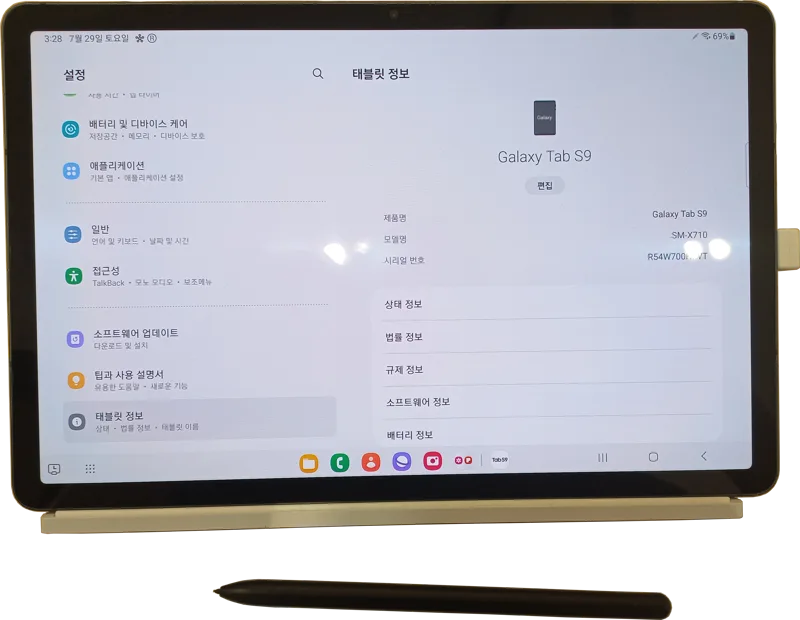
This is where the combined use-case guide undersells how much the tablet choice actually matters. The Galaxy Tab S9's 120Hz Dynamic AMOLED 2X display and included S Pen support make it a genuinely capable video color-grading and photo-retouching device, and its 8-12GB RAM configuration handles multi-layer editing in apps like Lightroom and PremierePro more comfortably than the base iPad. Speaking of which, the iPad (10th generation) remains the safer software bet purely because of app ecosystem maturity — LumaFusion, Procreate, and Final Cut Pro for iPad are still more polished and more frequently updated than their Android equivalents, even if the Tab S9's hardware occasionally edges it out on raw specs. Budget-conscious creators shouldn't overlook the Xiaomi Pad 6 either: its 144Hz refresh rate is overkill for editing but its 11-inch 1800x2880 display and Snapdragon 870 chip handle everyday photo culling and social-media-ready video exports at a third of the Tab S9's price, making it a genuinely smart second device for creators who want a dedicated editing tablet without the flagship cost.
Smartwatch: More Useful Than You'd Expect
A smartwatch isn't a creation tool, but for working creators it solves a specific problem: staying reachable and tracking shoot logistics without pulling a phone out of a bag mid-shoot, which matters more than it sounds when your phone is also your primary camera and you don't want to fumble it during a take. The Galaxy Watch6 pairs tightly with the Galaxy S24 for camera remote-shutter control and quick notification triage between takes, while the Pixel Watch 2 offers the same for Pixel 8 owners with cleaner Wear OS notification handling. For creators already in Apple's ecosystem, Watch Series 10's remote shutter and Camera Remote app integration with the iPhone 15 make it genuinely useful for solo creators shooting self-directed video content, letting you start and stop recording from across a room.
Storage and Cloud Workflow Reality
Creators fill storage faster than almost any other user type — raw photo files, 4K or ProRes video, and app caches for editing software add up quickly. None of the base 128GB configurations across these phones are realistic for a serious creator shooting video regularly; budget for at minimum the 256GB tier, and treat cloud storage (iCloud, Google One, Samsung Cloud) as a mandatory ongoing cost rather than an optional extra. Tablets compound this further since editing apps cache large temporary render files locally even when your source footage lives in the cloud — the Galaxy Tab S9's 256GB option is worth the premium over its 128GB base for anyone doing serious on-device video work.
Our Recommended Creator Setup by Budget
For creators without ecosystem lock-in and a flexible budget: Galaxy S24 for shooting versatility, Galaxy Tab S9 for editing, Galaxy Watch6 for on-set logistics — a fully matched Samsung ecosystem with S Pen support throughout. For creators already inside Apple's world: iPhone 15 for its editing-app maturity, iPad (10th gen) for the most polished mobile editing software available today, and Watch Series 10 for remote shutter control. For creators on a tighter budget who still want to produce professional-feeling output: Pixel 8 for computational-photography stills, Xiaomi Pad 6 as a genuinely capable budget editing tablet, and skip the smartwatch entirely until your workflow specifically demands it — it's the one piece of this setup that's a convenience rather than a necessity.
Accessories That Actually Change Your Output
Beyond the three core devices, a handful of accessories matter more to creator output quality than most buying guides admit. A clip-on lavalier or shotgun microphone that plugs into any of these phones via USB-C will do more for perceived video quality than any camera spec difference between the iPhone 15, Galaxy S24, and Pixel 8 combined — audiences forgive soft video far more readily than bad audio. A basic phone gimbal or tripod mount solves the handheld-shake problem that no amount of computational stabilization fully eliminates on any of these three phones. And for tablet-based editing, a stylus is not optional if you're doing any photo retouching or motion-graphics work: the Galaxy Tab S9's included S Pen support is a genuine cost advantage over the iPad, which requires buying the Apple Pencil separately at additional expense on top of an already premium tablet price.
Publishing and Export Considerations
Export speed and file compatibility matter once a project is actually finished, not just during editing. iOS and iPadOS handle direct export to Instagram, TikTok, and YouTube with fewer format-conversion headaches than Android in our testing, since Apple's H.264 and HEVC hardware encoders are tightly integrated with every major social app's upload pipeline. Android creators on the Galaxy S24 or Pixel 8 generally get equally fast uploads once exported, but occasionally hit format quirks with vertical 9:16 video that require an extra export pass through a dedicated app rather than a direct share. None of this is a dealbreaker for any of the three ecosystems, but it's worth testing your specific export-and-publish workflow before committing to a full creator setup around any one platform.